The main window of the application is shown in the figure below:
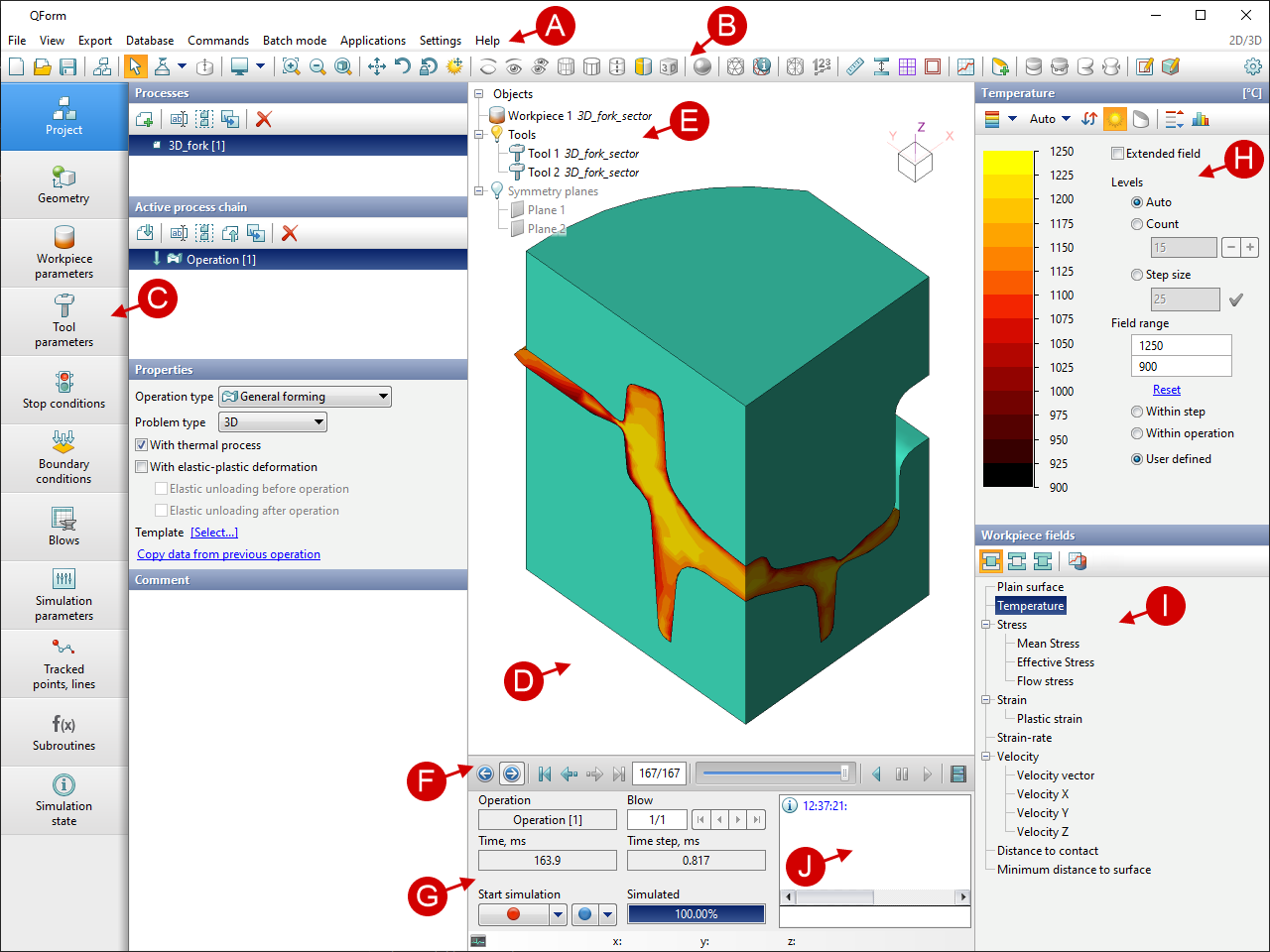
A |
contains menu items with a list of commands |
|
B |
contains icons of standard commands Windows, commands for managing simulation objects , icons of tools for analyzing simulation results and more |
|
C |
help the tabs of this panel, the corresponding sections of setting initial data for simulation are opened |
|
D |
visualize the initial data and simulation results |
|
E |
contains a list of all objects and boundary conditions specified for them, collections of section planes and symmetry planes, collections of tracking objects |
|
F |
contains tools for simulation results view and creating pictures and videos |
|
G |
is used to start and stop the simulation, and to monitor the simulation process |
|
H |
here the scale is displayed and its parameters are set |
|
I |
contains a list of calculated fields displayed in the workpiece and tool |
|
J |
contains simulation history and informational messages |