To view various information about the simulation it's necessary to select the tabSimulation state on Initial data panel. The information about the parameters of the active simulation step will be displayed in the opened tap.
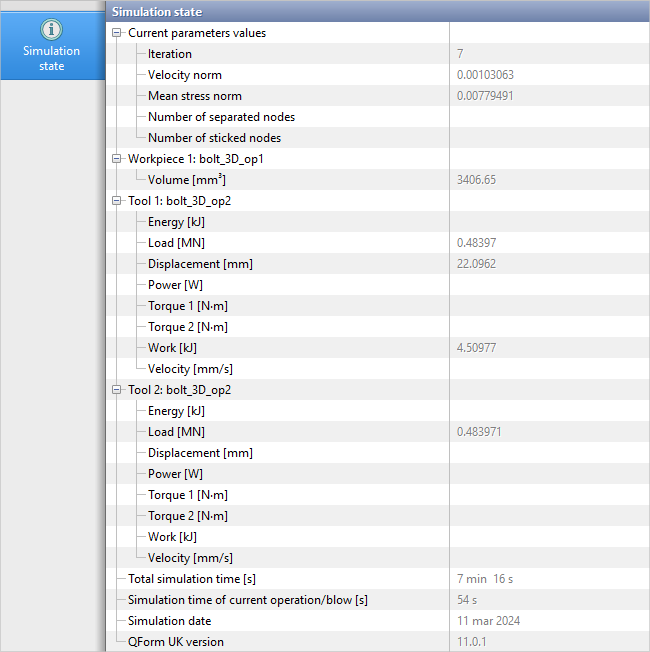
Current parameters values
Iteration – amount of iterations in the active solution step .
Velocity norm – relative velocity increment rate at the last iteration of the active solution step .
Mean stress norm – relative rate of increment in mean stress at the last iteration of the active solution step .
Number of separated nodes – number of the nodes separated from the tool during iterations.
Number of sticked nodes – the number of the nodes sticked to the tool during iterations.
You can find more in The algorithm of iterative solution of deformation problem at the integration step
Workpiece
Volume - workpiece volume calculated at the active step.
Tool
Energy – energy of the tool in the active step.
Load - load with which the tool acts on the workpiece.
Displacement – tool shift relative to the position at the first simulation step for a given operation/ blow.
Power – tool power .
Torque - torque developed by tool (in the presence of an rotation axis).
Work - tool work from the moment of the first simulation step for a given operation/ blow.
Velocity - strain velocity (tool velocity).
Other parameters
Total simulation time – total calculation time of all process steps up to the active calculation step.
Simulation time of the current operation/ blow – simulation time from the beginning of the current operation/ blow.
Simulation date – the date when the simulation was made.
Program version – program version in which the simulation was made.