Sometimes the computing power of the personal computer on which the QForm UKis installed, is not enough to carry out the simulation at a speed that satisfies the user. Therefore, the software offers the opportunity to use the computing power of a server located in the network. With a high data transfer rate through the network, this method can significantly reduce the simulation time.
Launch from the main menu Settings - Server settings:

A window Server settings will open, in which you can configure one of the simulation variants : Local, Client-server or Cloud. Variants Local And Client-server available in QForm UK, Cloud - in QForm UK Cloud.
Local - the simulation is made on a computer on which the user directly works with the software.
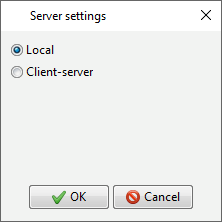
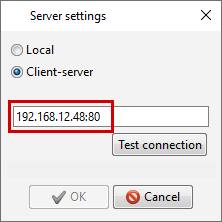
Client-server - the simulation is performed on a server in the local network, the IP address of which is indicated in the address bar. In this case, the user works with the software and views the results on his personal computer, receiving the results from the server. The server must also have the server version QForm UK installed.
In the address bar you need to specify the server IP address and port , as shown in the picture below:
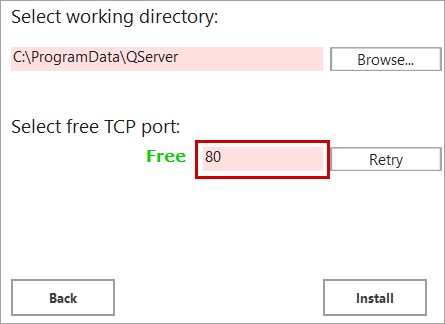
The port is specified during installation. QServer:
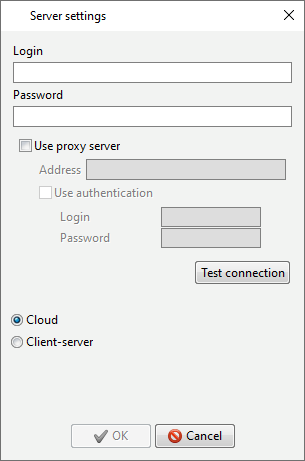
Cloud - the simulation is performed on the server, the data exchange with which is carried out via the global network. In this case, the user works with the software and views the results on his personal computer, receiving the simulation results from the server. In order to be able to simulate in the Cloud, you have to obtain from the organization providing this service, Login And Password which you have to enter in the appropriate lines. The HASP key is not required in this case.
|
Important |
Simulation of tracing points, lines and subroutines in mode Client-server or Cloud is carried out directly on the working computer without the participation of Servers. |
|
