Not all computational processes can be parallelized in QForm UK One of the most important parts of the simulation is solving the system of equations, and this task is fully parallelized in the program. At the same time, mesh generation and remeshing, system of equations assembly, contact problem solving, and some other processes are either executed in a single thread or only partially parallelized. In the settings of QForm UK, it is possible to specify the maximum number of threads to use for parallelizing the calculation. To do this, in the Main Menu, select Settings (1) - Number of threads to use (2):
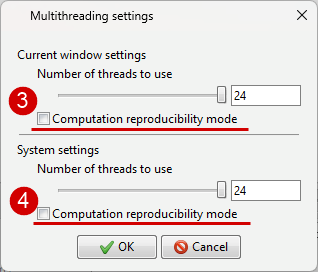
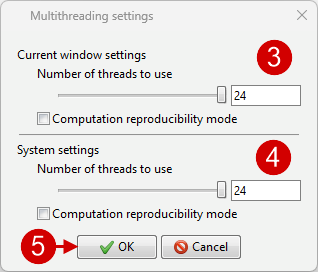
In theMultithreading Settings window, you need to select the desired number of threads using the slider (3) for the current program window only or using the slider (4) for the system: in this case, the multithreading settings will be saved for all subsequent program launches.
|
||||


For most computational tasks the program uses the Intel Math Kernel Library. Due to the parallelization of these tasks, an insignificantly small error accumulates. Therefore, when recalculating the same project on the same computer using the same version of the program, the results may differ slightly. To ensure reproducibility of results, you can: - perform all computations on a single thread (core) - enable reproducibility mode – in this case, only the tasks whose parallelization leads to error accumulation will be solved on a single core, while the remaining tasks will still be parallelized.
To activate this mode, in the Main Menu, select Settings (1) - Reproducibility Mode (2):
In the opened Multithreading settings window, you need to enable Computation reproducibility mode for the current window (3) or for the entire system (4). In the first case, the mode will be activated only for the current program window, while in the second case, the mode will be saved for all subsequent program launches.
|
||||