Statistics designed to analyze the distribution of simulation results. Statistics are displayed for the selected fields.
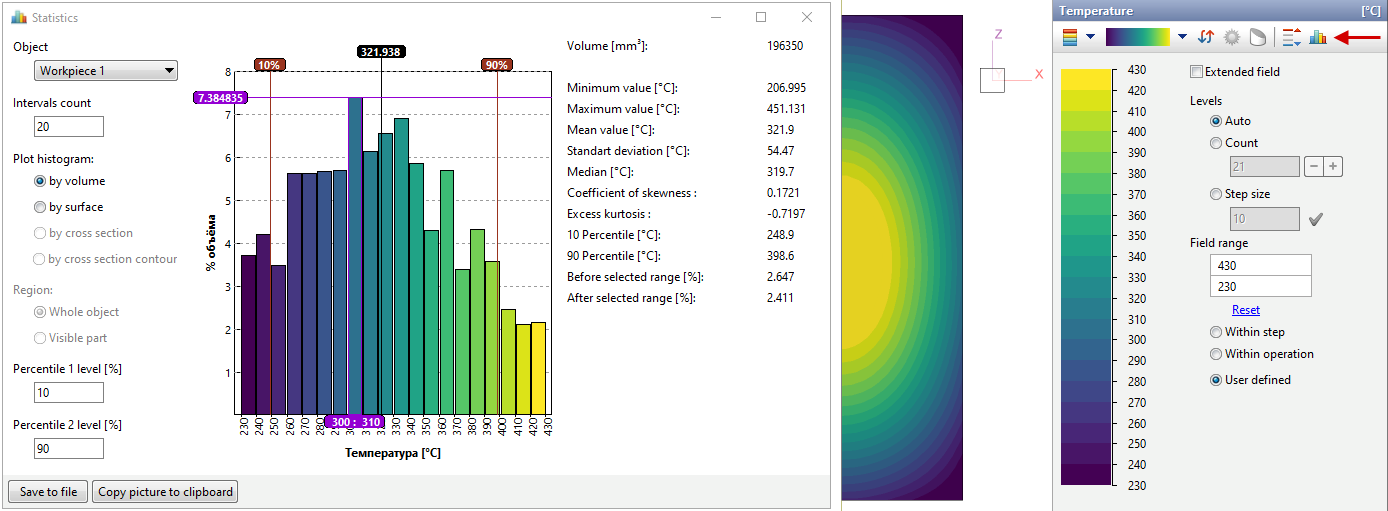
In the window Statisticsa histogram and the basic indicators of mathematical statistics are presented:
•Minimum value
•Maximum value
•Mean value
•Standart deviation
•Median
•Coefficient of skewness
•Excess kurtosis (pointedness)
•Percentile
The range of statistics calculation matches the range of values of the selected fields specified in the scale parameters. The color scheme of the histogram also matches the color scheme of the scale. If there are results outside the specified scale range, the window Statistics advanced lines appear Before selected range and After selected range, which indicate the proportions of results that are not taken into account in the analysis.
A histogram can be plot By volume or By surface. When using a cross cut plane, it is possible to plot a histogram By cross section or By cross section contour. Also, when using cross cut planes, it is possible to plot a histogram both for the whole object, and only for the visible part of the object. That is, if a part of the object is hidden when using cross cut planes, then when activating Region: Visible part the histogram will be plot only for the displayed part of the selected object.
When choosing By volume the value of the volume is displayed, when choosing By surface the value of the plain surface area is displayed, By cross section - the value of the cross cut plane area, By cross section contour- the value of the perimeter of the contour. When calculating these values, the symmetry planes are not taken into account.
It is possible to specify the intervals count, thereby changing the amount of histogram columns. Each column can be left-clicked to show or hide its borders.
There is a mark on the histogram with the value of the mean value. You can also manual specify percentile levels.
The following feature are available for export:
•Copy picture to clipboard
•Export statistics for operation-wide / blow (within steps)
•Export distribution at the current step
In addition, if the window is open Statistics, it is possible to add a histogram when Creating animations and images. Window size Statistics will match the size of the histogram in the animation or image.