To be noted that in the report template it is prohibited to program the automatic output of absolutely all QForm UK simulation parameters. Templates are designed to automate the routine process of creating uniform reports, so the automatic output of the most popular initial data for technical reports and simulation results is implemented.
Basic principles of work:
1. Report in QForm UKis generated based on the template with the extension *.dotx, created in the office application MS Word, or based on the template with extension *.potx, created in the office application MS PowerPoint.
2. The report template uses special tags to import from QForm UK initial data and simulation results (pictures with results, graphs and some numerical values).
3. Tags have to be specified as hyperlinks. In this case, the address of the link is important, not its name. The Name can be anything.
4. The report is being complitedonly for the active operations chains in the open project QForm UK.
List of general links for a template:
Hyperlink |
What is displayed in the technical report |
//qform/version |
The version ofQForm UK in which the project is open |
//project/name |
project Name (*.qform- file name ) without extension |
//project/name_ext |
project Name (*.qform- file name ) with extension |
//process/name |
active process Name |
//chain/operations/name/type/ptype |
List of names, types and types of tasks of all operation of the active chain* |
//oper/[sequence number of the operation in the chain]/name/type/ptype |
Name, type and problem type of the specified operation* |
*If necessary, only one of the parameters can be displayed/name,/ typeor/ptypeor a set of required parameters.
To refer to a specific operation of an active operations chain, use the tag /oper/[sequence number of the operation in the chain]
If instead [sequence number of operation in the chain]use last, then the data for the last operation of the active operations chain is displayed.
|
Information |
Tag /oper/[sequence number of the operation in the chain] assigns an operation number to all subsequent tags. That is, it does not need to be specified every time if the data is output for the same operation. This feature is recommended to use for templates creating. *.dotx For MS Word. When creating a template for MS PowerPoint special attention have to be paid to the fact that QForm UK reads tags not from top to bottom, but in the order of adding blocks with text on the slide. To avoid possible problems when work with a template *.potx It is recommended that all tags include the operation number. In MS Word in tags forward slashes / are used. In MS PowerPoint backslashes \ are used. |
|

Examples of links for a template, taking into account the operation number:
Hyperlink |
What is displayed in the technical report |
//oper/ 1/name/type/ptype |
Name, type and problem type of the 1 operation |
//oper/last/name |
Name of the last operation |
//oper/ 2/name/type |
Name and type of the 2 operation |
Output of initial data depending on the workpieces number. General tag structure: //oper/[serial number of the operation in the chain]/wp/[ workpieces number]/[parameter]
Output of other initial data that does not depend on the workpieces number. General tag structure: //oper/[serial number of the operation in the chain]/[parameter]
General tag structure: //oper/[serial number of the operation in the chain]/blow/[ blow number ]/[parameter] Tag /blow/[ blow number] used to display blows parameters from the tab Initial data panelBlows in case of multi-blow operation. Instead of [ blow number]can be used last, in this case, the data is derived from the last blow. List of initial data parameters for the workpieces:
template links examples:
|
General tag structure: //oper/[sequential number of the operation in the chain]/tool/[ tool number]/[parameter] List of initial data [parameters] for the tool:
List of initial data parameters for a tool that do not depend on the tool number. General tag structure: //oper/[serial number of the operation in the chain]/[parameter]
template links examples:
|
General tag structure://image/oper/[serial number of the operation in the chain]/blow/[ blow number ]/record/[ record number ]/[ object type ]/[ object number ]/[ fields name ]/legend/[ image width in pixels]/[ image height in pixels]/online The purpose of each component of the tag for displaying of pictures with simulation results is analyzed point by point below: 1. Tag //image required part of the tag. 2. Tag /oper/[sequence number of the operation in the chain] assigns an operation number. 3. Tag /blow/[ blow number] assigns the blow number to the active operation. 4. Tag /record/[ record number] assigns the active blow record number to the active operation. Instead of the [record number]can be used last, in this case, the results of the last record are displayed.
5 . Tag /[object type] indicates for which objects it is necessary to display fields: for Workpiece - wp, for Tool - tool, to display general fields Workpiece and Tool the tag wp_tool is used
6 . Tag /[ fields name ] defines the calculated field to be displayed. List of possible values for this tag:
List of special fields forQForm UK Extrusion:
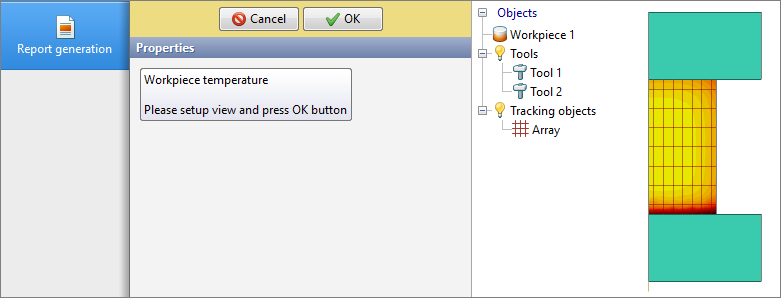
7. Tag /legend adds to the picture the scale of the displayed calculated field. 8. tags /[ image width in pixels]/[ image height in pixels]/ - set the picture resolution. If the tag is not exist, then the picture dimensions are set based on the scaling of objects in the open window of QForm UK 9. During the record of pictures with simulation results, it is recommended to use the manual options mode. To do this, at the end of the picture output tag, there should be a tag /online. In this case, the picture is recorded in the report that the user sets up in QForm UK during creating a report. When record pictures, the name of the link from the template will be displayed as a hint to the program interface. For example, if the template specified a link with the address //image/online and name "Workpiece temperature ", then when report generation, the user will see the following on screen:
template links examples:
Output of the minimum and maximum values of the calculated fields:
//oper/[sequential number of operation in the chain]/blow/[ blow number ]/record/[ record number ]/[ object type ]/[ object number ]/[ fields name ]/min //oper/[serial number of the operation in the chain]/blow/[ blow number ]/record/[ record number ]/[ object type ]/[ object number ]/[ fields name ]/max |
||||||||||||||||||||||||||||||||||||||||||||||||||||||||||||||||||||||||||||||||||||||||||||||||||||||||||||||||||||||||
It is possible to display a graph or two graphs simultaneously as a raster image in the report. The Graph looks exactly the same as in the window QForm UK. General tag structure: //chart/clip/oper/[ operation number ]/blow/[ blow number ]/[ object type ]/[ object number ]/[argument]/[function ]/[ object type ]/[ object number ]/[function]/[ image width in pixels]/[ image height in pixels]/decreasing/null /decreasing - if the tag contains this command, then the graph is built by decreasing the argument /null - if the tag contains this command, then the graph is built taking into account the zero of the function List of arguments and functions:
Combination examples [ object type ]/[ argument]/[function] for QForm UK Extrusion:
template links examples:
|
General tag structure://oper/[sequential number of operation in the chain]/blow/[ blow number ]/record/[ record number ]/[parameter]
|
 | Tags for outputting initial data and simulation results for QForm UK Extrusion |
General tag structure: //[parameter] initial data tags:
Simulation results:
Tags for creating pictures and graphs look at the sections above Simulation results - graphs and Simulation results - pictures. |
See also: