In the QShape geometry editor the geometry for 3D simulation is being prepared.
Solid state formats can be used as input format STEP, IGES, and surface format IGES. The following formats are used as the output format SHL And QSHAPE.
Standard window arrangement QShape shown in the figure below:
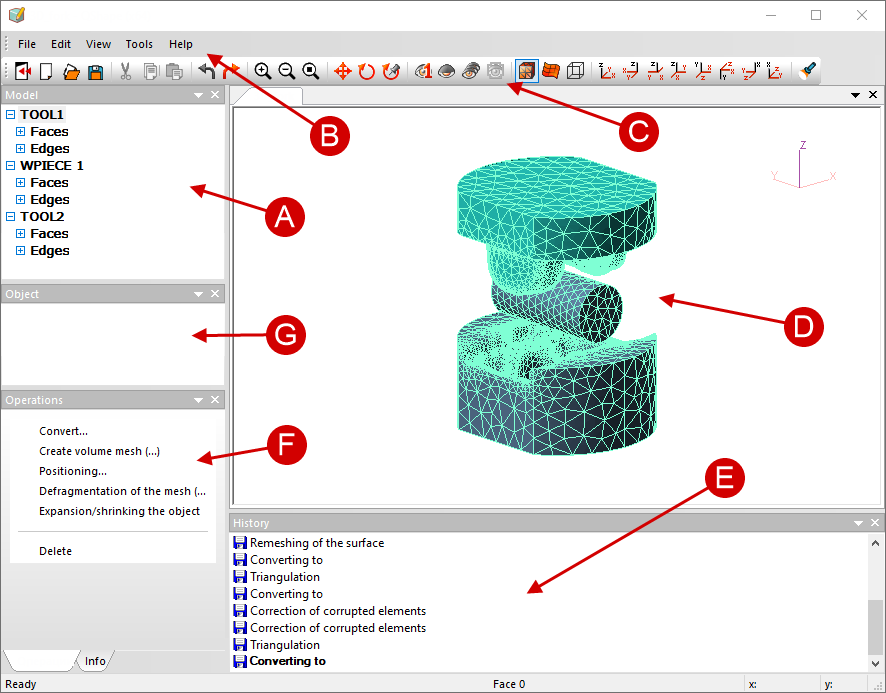
A |
List of geometric models and objects (the Model window) |
contains a list of all geometric models, a list of edges (edges) and surfaces (faces) describing these models, etc. |
B |
List of geometric models and objects (the Model window) |
contains menu items with a list of commands |
C |
Toolbar |
contains icons of the standard commands of Windows, objects management commands and more |
D |
Window for displaying geometric objects |
serves to visualize geometric models and objects |
E |
operation History |
contains a list of all operations performed during the geometry preparation process |
F |
Operation window |
here, depending on the type of the selected object, commands appear that can be applied to this object |
G |
Structure of the selected object (window An Object) |
contains a list of all edges or surfaces corresponding to the selected plain surface or edge, respectively, and also, in the case of mesh defects, a list of bad elements (bad elements) and open chains of edges (chains) |