Graphics editor QDraft can be launched by clicking the icon  on Toolbar QForm UK.
Exit by clicking the icon  on the toolbar QDraft or via command Return to projectlocated in the menu File.
The main window of the application is shown in the figure below:
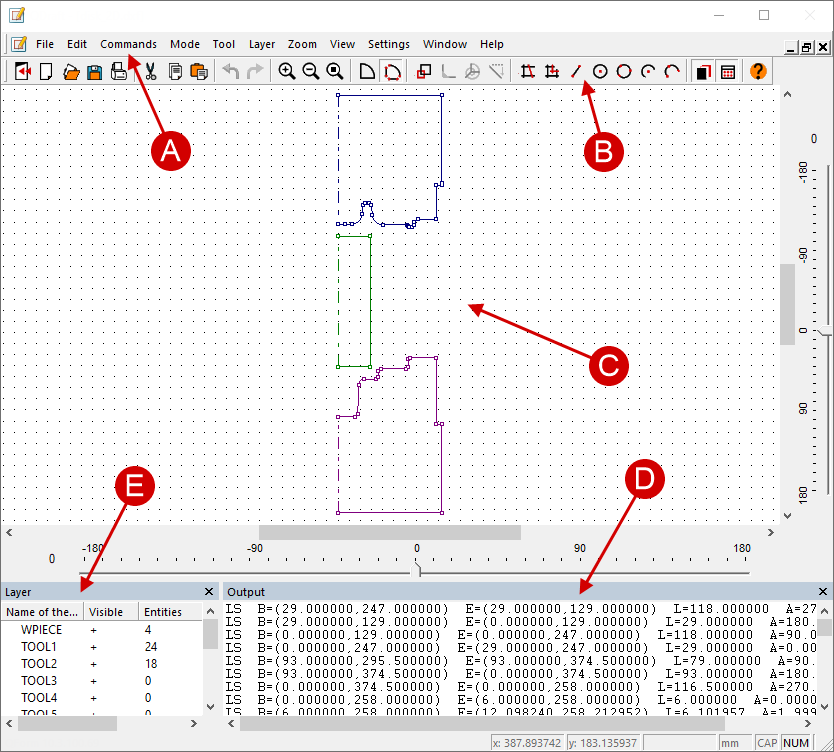
A |
Main menu |
contains menu items with a list of commands |
B |
Toolbar |
contains icons of standard commands Windows, commands for managing objects, tools for geometric constructions and more |
C |
Window of geometric constructions |
to visualize 2D geometry and geometric constructions |
D |
Info window |
contains a list of layers that are present in the drawing and information about them |
E |
Layers window |
contains the list of layers that are present in the drawing and info about them |