The program provides several working modes. After launching the program, navigate to the License Info tab.
To access the License Info tab, do the following:
1.Open tab Help
2.Click on License
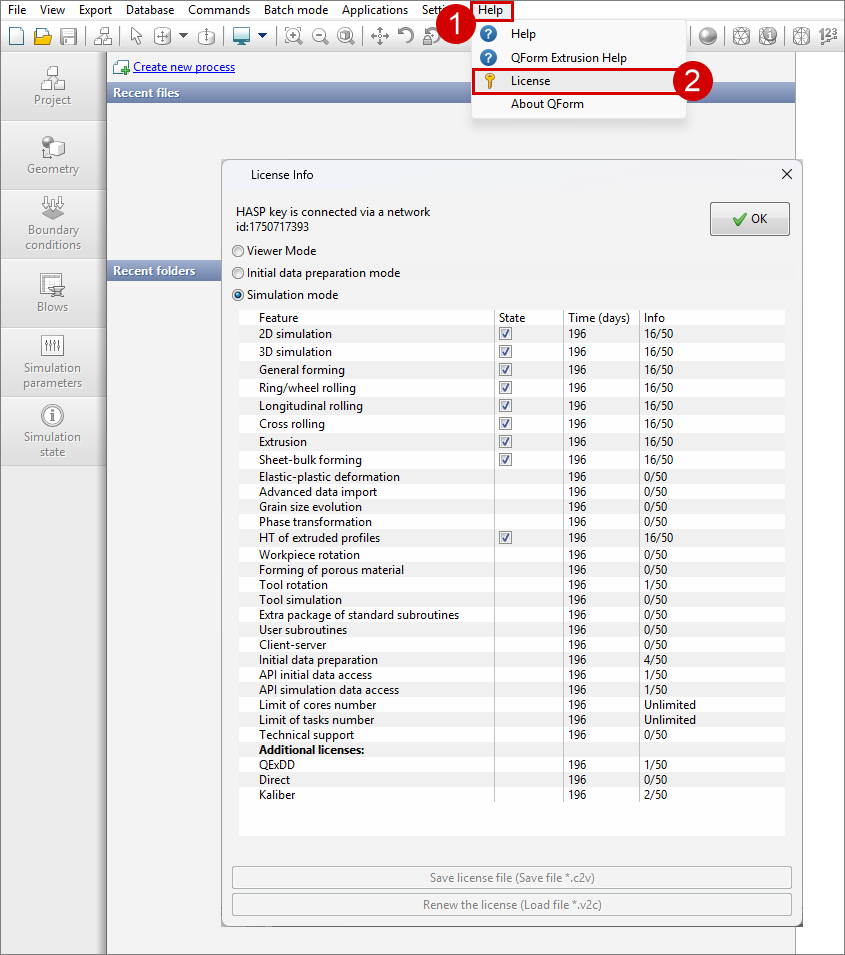
Then, the License Info window opens, offering three modes, each intended for different stages of working with simulation results and preparing initial data:
1. Simulation mode
This mode provides comprehensive access to all major functionalities of the program:
•view of previously obtained calculation results;
•preparation of the necessary initial data for subsequent simulation;
•performing direct simulation.
2. Initial data preparation mode
Intended for the preliminary preparation stage:
•creating initial data required for subsequent analysis and calculation;
•also, there is an option to review existing calculation results.
3. Viewer Mode
Only access to viewing ready-made results of previously performed calculations is provided.
|
Information |
In the State column, you can selectively disable some license options if a network key is being used, so as not to occupy space in the license. You can read more about the license options in License Management |
|
